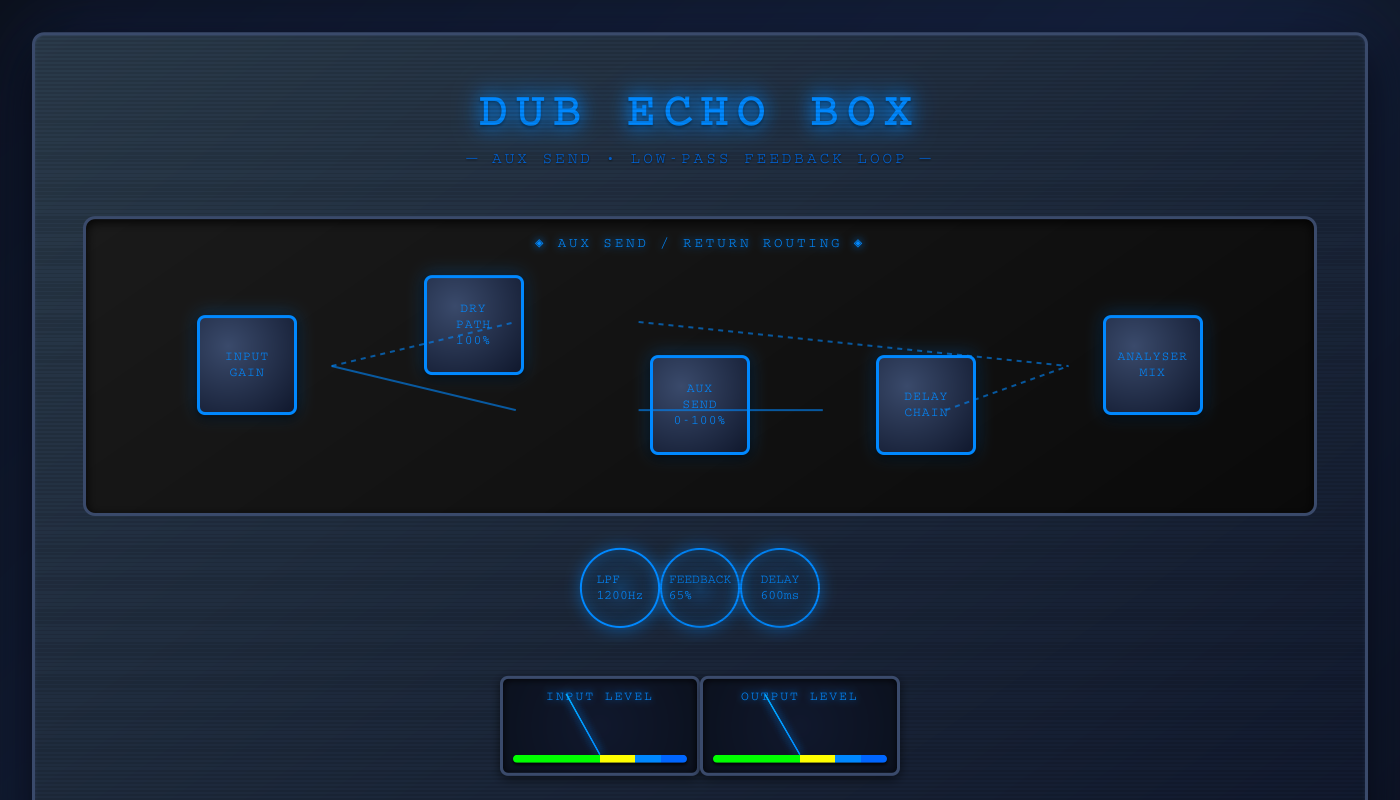
This interactive console is both an educational tool and a tribute to the engineers who invented dub. By making professional console architecture interactive and visual, we reveal the intelligence and creativity behind the mixing desk—showing that dub’s “magic” was actually sophisticated audio engineering.
DUB ECHO BOX
🎛️ AUX-STYLE DUB ECHO SIGNAL PATH
1. Complete Signal Flow (Aux Send Architecture)
2. Feedback Loop Detail
• Delay output splits: one path to speakers (wet), one to feedback chain
• 65% of signal passes through low-pass filter (removes highs)
• Filtered signal feeds back into delay input
• Each echo becomes progressively darker and quieter
• Low-pass at 1200Hz creates warm, tape-like decay
3. Aux Send vs Parallel Architecture
4. Key Differences from First Code
| Feature | First Code (Ghost Console) | This Code (Dub Echo Box) |
|---|---|---|
| Architecture | Parallel dry/wet | Aux send/return |
| Dry Signal | 70% fixed (dry gain node) | 100% always (through inputGain) |
| Effect Control | Fixed 40% wet gain | Variable 0-100% send level |
| Filter Type | High-pass (420Hz) | Low-pass (1200Hz) |
| Filter Position | Before feedback | After feedback (in loop) |
| Delay Range | 1-1200ms | 0-2000ms (0-2 sec) |
| Saturation | Yes (tape waveshaper) | No saturation |
| Visualization | Spectrum + X/Y scope | None |
| Recording | Yes (WAV export) | No |
| Sonic Character | Bright, aggressive, modern | Dark, smooth, vintage |
5. Code Implementation
// NODE CREATION
const inputGain = ctx.createGain();      // Dry signal path
const sendGain = ctx.createGain();       // Controls effect send amount
const delay = ctx.createDelay(4.0);      // Up to 4 seconds delay
const feedbackGain = ctx.createGain();   // Controls echo repeats
const filter = ctx.createBiquadFilter(); // Low-pass for warmth

filter.type = "lowpass";
filter.frequency.value = 1200;

// ROUTING (AUX SEND STYLE)
inputGain.connect(ctx.destination);      // Dry: 100% direct to output
inputGain.connect(sendGain);             // Send: variable amount to delay

sendGain.connect(delay);                 // Send → Delay
delay.connect(ctx.destination);          // Wet: delay output to speakers

// FEEDBACK LOOP
delay.connect(feedbackGain);             // Tap delay output
feedbackGain.connect(filter);            // 65% through filter
filter.connect(delay);                   // Filtered signal back to delay ⟲
6. Signal Flow Step-by-Step
↓ Splits into two parallel paths
2. DRY PATH (always 100%):
InputGain → Speakers ✓
Original signal, unprocessed, full volume
3. SEND PATH (0-70% variable):
InputGain → SendGain → Delay
User controls how much signal enters effect
4. DELAY OUTPUT (wet signal):
Delay → Speakers ✓
Delayed signal mixed with dry
5. FEEDBACK LOOP:
Delay → FeedbackGain (65%)
→ Low-Pass Filter (1200Hz)
→ Back to Delay input ⟲
Result: Clean dry signal + warm, filtered echo repeats
7. Filter Comparison: HPF vs LPF
8. Control Parameters
🎚️ Send Level (0-100%)
Controls how much signal enters the delay chain
• 0% = dry signal only (no effect)
• 70% = default mix (typical dub amount)
• 100% = maximum effect intensity
Key advantage: Dry signal stays at 100% regardless of send amount
⏱️ Delay Time (0-2 seconds)
Time between echo repeats
• 0.6s default = relaxed dub timing
• Longer range than first code (2s vs 1.2s)
• Allows for super long, ambient delays
🔁 Feedback (0-95%)
Controls number and decay of echo repeats
• 65% default = multiple clear repeats
• Higher = longer decay tail
• Capped at 95% to prevent runaway feedback
🎛️ Low-Pass Cutoff (300-6000Hz)
Frequency where high-end rolloff begins
• 1200Hz default = warm, dark tape sound
• Lower = darker, more muffled repeats
• Higher = brighter, clearer echoes
Effect: Each repeat loses more high frequencies
9. Why "Aux Send" Architecture?
This design mirrors professional studio mixing consoles from the 1960s-80s:
• Aux sends on mixing consoles sent variable amounts of each channel to external effects units (reverb, delay)
• Dry signal remained at unity gain on the main fader
• Effect returns came back on separate channels and mixed with dry
• Engineer could dial in "how much effect" without affecting dry level
Advantages for Dub Music:
• Clean separation between dry and wet signals
• Easy to automate send level for "dub drops" (effect swells)
• Dry vocal/instrument stays clear and upfront
• Effect can be pushed without overwhelming the mix
Code Benefits:
• Simpler routing (5 nodes vs 8 nodes)
• More intuitive control (single "send" parameter)
• Less CPU (no separate wet/dry gain nodes)
• Better for live performance/automation
10. Summary: Two Approaches to Dub Delay
| Aspect | Ghost Console (Parallel) | Dub Echo Box (Aux Send) |
|---|---|---|
| Design Philosophy | Guitar pedal / modern FX | Mixing console / classic studio |
| Sonic Character | Bright, aggressive, spacious | Dark, warm, vintage |
| Filter Effect | Progressive brightening (HPF) | Progressive darkening (LPF) |
| Complexity | More nodes, more features | Simpler, more focused |
| User Control | Fixed mix, adjust delay params | Variable send, simple interface |
| Best For | Creative production, FX processing | Traditional mixing, live use |
| Tape Simulation | Yes (saturation waveshaper) | Yes (filter darkening only) |
| Total Nodes | 8 nodes + analyser + recorder | 5 nodes (minimal) |
Ghost Console is like a modern boutique delay pedal — feature-rich, bright and clear, with sophisticated processing and visualization. It's designed for creative sound design and production work.
Dub Echo Box is like a vintage tape echo unit — simple, warm and dark, with classic mixing console workflow. It's designed for traditional dub mixing and live performance.
Both achieve authentic dub delay sounds through different approaches, reflecting the evolution of delay effects from analog tape units to digital processors.